![[personal profile]](https://www.dreamwidth.org/img/silk/identity/user.png) oio11
oio11[HOW TO] Install and Integrate Dropbox with Thunar
Tuesday, November 13, 2012
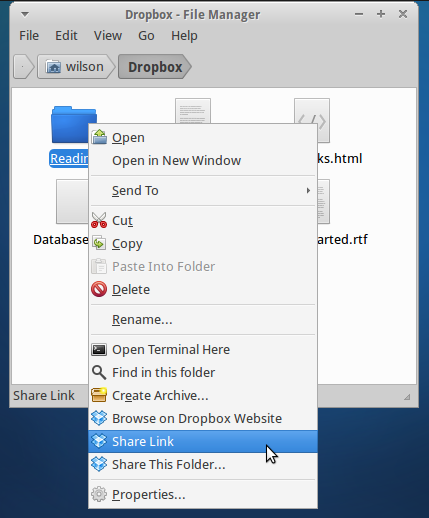
In this article we'll see how to install Dropbox and Thunar integration in Xubuntu.
Install
Choose one of the alternatives and run the corresponding command on a terminal window:Alternative #1 - Install both Dropbox and Thunar plugin
cd && plat=`uname -m`; if [ $plat != "x86_64" ]; then plat="x86"; deb="i386"; else deb="amd64"; fi; wget -O - "http://www.dropbox.com/download?plat=lnx.$plat" | tar xzf - && wget -O dropbox-thunar-plugin.deb http://packages.crunchbang.org/waldorf/pool/main/thunar-dropbox-plugin_0.2.0-1_$deb.deb && sudo dpkg -i dropbox-thunar-plugin.deb && rm dropbox-thunar-plugin.deb && ~/.dropbox-dist/dropboxd Alternative #2 - Install only the Thunar plugin
Choose this option if you have Dropbox already installed.cd && plat=`uname -m`; if [ $plat != "x86_64" ]; then deb="i386"; else deb="amd64"; fi; wget -O dropbox-thunar-plugin.deb http://packages.crunchbang.org/waldorf/pool/main/thunar-dropbox-plugin_0.2.0-1_$deb.deb && sudo dpkg -i dropbox-thunar-plugin.deb && rm dropbox-thunar-plugin.deb Alternative #3 - Install only Dropbox
Choose this option if you which to install Dropbox in Xubuntu but don't care about the Thunar integration.cd && plat=`uname -m`; if [ $plat != "x86_64" ]; then plat="x86"; fi; wget -O - "http://www.dropbox.com/download?plat=lnx.$plat" | tar xzf - && ~/.dropbox-dist/dropboxd Usage
After installing, Thunar must be restarted (killall Thunar && Thunar) for the plugin to work and Dropbox must be running. Also, you may want to add Dropbox to startup, see this and use /home/YOUR_USER/.dropbox-dist/dropboxd as the command (replace YOUR_USER with your username.References
How To Install Dropbox In Xubuntu And Get Thunar Integration (Xfce)http://xubuntugeek.blogspot.com/2012/11/how-to-install-and-integrate-dropbox.html


