![[personal profile]](https://www.dreamwidth.org/img/silk/identity/user.png) oio11
oio11Загрузка YouTube видео с помощью youtube-dl в Ubuntu 9.04
youtube-dl небольшая консольная программа для загрузки видео с YouTube.com. Она позволяет сохранять видео как .flv файл. Это статья показывает, как установить и использовать его на Ubuntu 9.04.
1. Установка youtube-dl
youtube-dl доступна в качестве пакета Ubuntu, поэтому мы можем открыть терминал и установите его следующим образом:
sudo aptitude install youtube-dl
2. Использование YouTube 2-DL
Чтобы узнать об использовании youtube-dl's, заглянем в справку:
man youtube-dl
В основном это работает следующим образом:
youtube-dl -o [name of output file] [YouTube URL]
Например:
youtube-dl -o test.flv http://www.youtube.com/watch?v=6mIZvDD0RkQ
Таким образом сохранилось видео c http://www.youtube.com/watch?v=6mIZvDD0RkQ как test.flv в текущий каталог.
Для просмотра загруженного видео, перейдите в директорию куда был сохранен test.flv и дважды щелкните по файлу:
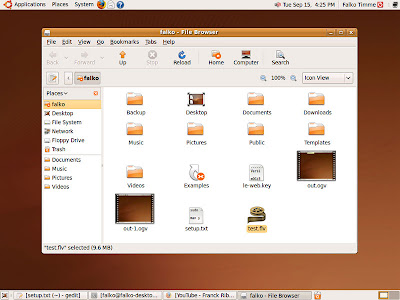
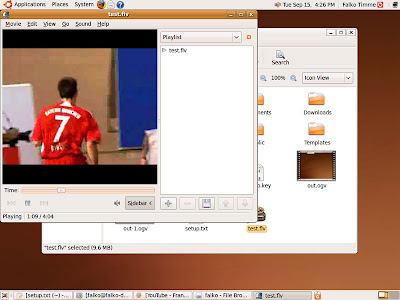
Будет открыт Movie Player и начнется воспроизведение видео.
1. Установка youtube-dl
youtube-dl доступна в качестве пакета Ubuntu, поэтому мы можем открыть терминал и установите его следующим образом:
sudo aptitude install youtube-dl
2. Использование YouTube 2-DL
Чтобы узнать об использовании youtube-dl's, заглянем в справку:
man youtube-dl
В основном это работает следующим образом:
youtube-dl -o [name of output file] [YouTube URL]
Например:
youtube-dl -o test.flv http://www.youtube.com/watch?v=6mIZvDD0RkQ
Таким образом сохранилось видео c http://www.youtube.com/watch?v=6mIZvDD0RkQ как test.flv в текущий каталог.
Для просмотра загруженного видео, перейдите в директорию куда был сохранен test.flv и дважды щелкните по файлу:

Будет открыт Movie Player и начнется воспроизведение видео.

Posted 22nd October 2009 by MaxPv
http://maxpv.blogspot.com/2009/10/youtube-youtube-dl-ubuntu-904_22.htmlyoutube-dl
Documentation
Index
.http://rg3.github.com/youtube-dl/documentation.html
.....................
I am using youtube-dl to download some videos from youtube. But when I write:
youtube-dl http://www.youtube.com/watch?v=rn_YodiJO6k [youtube] Setting language [youtube] rn_YodiJO6k: Downloading video webpage [youtube] rn_YodiJO6k: Downloading video info webpage [youtube] rn_YodiJO6k: Extracting video information ERROR: unable to download video Answer
Same question was asked on unix.stackexchange.com. Youtube changed something to make it incompatible with youtube-dl, it's been fixed in the latest version. Use the following to update youtube-dl until the package system gets the updated version: |
Howto fix youtube-dl's "ERROR: unable to download video"
http://librelist.com/browser//homebrew/2012/9/27/info-howto-fix-youtube-dl-s-error-unable-to-download-video/
youtube-dl-gui
front-end GUI of the popular youtube-dl.py Python script. This tool allows downloading multiple videos at the same time and convert them into mp3.
Theoretically, it should run on all platforms, but it is only tested on Windows and Linux.
On Linux, the ffmpeg, ffprobe, and wxPython need to be installed separately. On Debian derived distros:
sudo apt-get install ffmpeg ffprobe python-wxgtk2.8 python-wxtools wx2.8-i18n libwxgtk2.8-dev libgtk2.0-dev libavcodec-extra-5On Windows, those softwares are included in the zip file.
Special thanks to youtube-dl.py authors for creating such a wonderful script :)
http://code.google.com/p/youtube-dl-gui/
youtube-dl with aria2
ERROR: unable to download video webpage: HTTP Error 404: Not Found
..........a problem with some youtube videos. For example this video http://www.youtube.com/watch?v=I7HahVwYpwo won't download.
youtube-dl's output is the following:
[youtube] Setting language
[youtube] I7HahVwYpwo: Downloading video webpage
ERROR: unable to download video webpage: HTTP Error 404: Not Found
system information:
debian -squeeze
youtube-dl version: 2011.01.30
rtmpdump is installed
............................
$ youtube-dl -t 'http://www.youtube.com/watch?v=I7HahVwYpwo'https://gist.github.com/3f8f684332ec603083a0
https://github.com/rg3/youtube-dl/issues/80
http://www.youtube.com/watch?v=tU3Bgo5qJZE&feature=player_detailpage


![[identity profile]](https://www.dreamwidth.org/img/silk/identity/openid.png)
With a 404 HTTP error when downloading the webpage, it will create a VIDEO_ID.html file in your hard drive with YouTube's response, that you can send me or post back, so we can read it.